Book a demo

HUD COMPLIANCE SOFTWARE · 50059 · TRACS

HUD compliance that catches the missing 50059 before TRACS does.

Keep the household details, supporting documents and certification checks together for HUD Multifamily PBRA. Prepare the 50059 or 50059-A, review what’s missing and send it through TRACS over iMAX without the avoidable rejections.

Find the blocker while you can still correct the file.

Choose your portfolio type to see the most relevant examples.

An ExactEstate HUD-50059 rent calculation in front of the HUD submission queue, the resident account, AUR/NAUR income checks and each form’s status from generated to accepted.

One Section 8 umbrella. Two very different HUD filing paths.

Project-Based Section 8, Section 202, Section 811 and RAD to PBRA each certify their own way; ExactEstate runs yours, not a generic HUD template.

Public housing agencies file the HUD-50058 instead, and software for public housing agencies covers that path.

The HUD-50059 built from the resident workflow: household members, income, assets, deductions, verification and approval, with the 50059-A for move-outs, transfers, gross rent changes and terminations.

Don’t retype a family just to build its 50059.

A specialist already checked income and gathered household details. Start the HUD-50059 from that record, so the certification can be validated and reviewed without another round of manual entry. HUD estimates 30 minutes of paperwork per 50059. ExactEstate starts the form already filled from the household record.

The household’s recorded income, verification and approvals become the HUD-50059. Your team reviews the result instead of re-entering the same facts.

A HUD-50059 generated, approved and queued for TRACS

PROGRAM FORMS · AFFORDABLE HOUSING MODULE

Get the 50059 signed without an office visit.

Send the HUD-50059, lease renewals and recertification notices for ExactSign e-signature from the household record. Residents sign from their phone, and so do staff.

Find the missing TRACS field before it becomes a rejection.

ExactEstate flags incomplete information before the MAT file is built and shows the TRACS route configured for the property.

TRACS MAT files go over iMAX to the Contract Administrator on HUD's released 202D specification, and the returned status stays on the record.

Know a certification is ready before it reaches TRACS: readiness shows what is missing or conflicting, the MAT file goes over iMAX to the Contract Administrator, and the returned status stays on the record.

EEVA PORTFOLIO INTELLIGENCE

The recert clock shouldn’t surprise the property.

Upcoming 50059 recertifications start outreach and document collection early, so staff can fix what is missing before the TRACS deadline. Inspection Ready brings the checklist, open deficiencies and related work orders together 45 days before each annual unit inspection.

Open each 50059 recertification at 120 days.

Recert on Rails sends each household its notices and document requests by email and text at 120, 90, 60 and 30 days, reviews the verifications that come back, drafts the 50059 and books the interview. Your staff sign it off before it goes to TRACS.

Clear overdue certifications before the MOR.

Every morning, Audit Ready finds missing and expired evidence and overdue certifications in each household file, sends the household a document request and gives staff a task to close the gap, then helps assemble the packet for your next MOR.

Know which households new income limits affect.

When published guidance or values change, such as new HUD income limits, Rule Change Response shows which workflows and household files are affected and what the change could mean, and gives each affected property a task to review them and queue any notices. You approve each change before it takes effect.

A person reviews every flagged document.

When an application comes in, Screening Shield checks every document for signs of tampering, adds bank-verified income where it is available and puts any concerns in one packet, with the reasons, for staff to review. It never contacts the applicant and never approves or denies anyone.

HOTMA follows the program and effective date—not guesswork.

For HUD Multifamily owners, Notice H 2025-07 (December 17, 2025) sets full HOTMA compliance for January 1, 2027. Public housing agencies follow Notice PIH 2026-15, with the same January 1, 2027 date, and USDA Rural Development has required HOTMA on certifications effective since July 1, 2025.

ExactEstate applies HOTMA per property from its adoption date, and prepares TRACS files to the released 202D specification until HUD publishes 203A.

When a HAP amount changes, the ledger should know.

A certification's tenant rent and assistance payment post to the same resident ledger and general ledger, so nobody reconciles HAP in a separate system.

Bring a certification that changed a tenant rent and watch the two meet on screen.

ExactEstate budget entry on a desktop monitor, tablet and phone

ALSO IN EXACTESTATE

Compliance

Follow inspection corrections through to completion.

Don’t wait for the HUD inspection to discover the expensive deficiencies. ExactEstate estimates NSPIRE results by inspectable area from your recorded inspection, so your team can prioritize the items worth correcting.

NSPIRE estimated score

Source: “Properties that receive two successive scores under 60 may be referred to HUD's Departmental Enforcement Center (DEC) for evaluation.” 24 CFR 5.711

Compliance

Share inspection findings in a report stakeholders can follow.

Turn the inspection work you’ve already done into a usable report: export unit or property findings with severity, estimated scores and the scoring explanation in a PDF.

NSPIRE PDF reports and scoring guide

Compliance · Leasing

Manage waitlists with clear rules and a reviewable history.

Preferences first, then the date and time each application arrived, with documented preference policies on NAHASDA/IHBG properties and a logged entry every time the top of the list shifts, so a reviewer can see why each applicant sits where they do.

Waitlist ranking

Source: “The goal of the annotation is to provide an auditable record of applicant additions, selections, withdrawals, and rejections.” HUD Handbook 4350.3 REV-1, ch. 4, §4-18

AI · Compliance

Find compliance issues before the auditor does.

Spend review time where the findings are. Risk signals rank which household files your specialists should open first.

EEva Portfolio Intelligence: Compliance-violation risk forecast

Source: “Owner failed to provide annual certifications or provided incomplete or inaccurate certifications” IRS Form 8823, line 11d

Compliance

Find the compliance forms tied to your property.

Start with the forms that belong to your property instead of searching a shared drive. Review suggested HUD, LIHTC and state forms, preview the set and download the package.

Compliance document library

Compliance · Marketing

Keep the fair housing marketing history ready for review.

Know which listings earned their space. Export listing history and lead counts by address and month before you renew or expand a channel.

Affirmative Fair Housing Marketing (HUD-935.2A) pack

Source: 24 CFR 200.620

Compliance

See admission results by income tier for HUD review.

See the income mix behind your targeting percentages. Review admissions and income tiers property by property before the next compliance check.

Income Targeting Log

Accounting · Compliance

See how a subsidy adjustment affects the ledger.

A retroactive subsidy change should not leave a resident with the wrong balance. Preview the monthly adjustment before posting the corrected entries to the ledger.

Retroactive subsidy reallocation

Source: 24 CFR 982.516

Residents · Compliance

Let residents submit documents before staff begin reviewing.

Residents enter wages, assets, benefits and expenses in the portal, so your team starts each certification with the information already in hand.

Income and asset self-certification

Source: HUD PD&R Admin Fee Study

Maintenance · AI

Turn inspection findings into follow-up work.

Turn inspection evidence into the next task without re-entering the details. EEva Vision drafts findings and work orders from inspection photos, and staff review any resident charge.

EEva Vision inspection findings

Compliance · Residents

Start outreach 120 days before recertification.

Start every certification with time to gather documents: the first notice goes out 120 days before the anniversary, with follow-ups at 90, 60 and 30 days.

120-day first recertification notice

Source: HUD Handbook 4350.3 REV-1, chapter 7

Compliance · Maintenance

Track NSPIRE corrections on the right deadlines.

Keep deficiencies from slipping past their correction dates. Track the assigned NSPIRE severity and deadline on each open item, including the 24-hour deadline for life-threatening deficiencies.

Settable NSPIRE correction deadlines

Source: 24 CFR 5.711

Ask EEva what’s blocking this exact HUD file.

EEva answers from the property's own configuration and names the authority behind it, so nobody searches Handbook 4350.3 for a generic rule.

ExactEstate also tracks new HUD notices and holds each change for a person to review.

The example below uses a sample property.

Example — sample data

You ask

Has Cedar Square (sample) adopted HOTMA early, and which rules apply to its recertifications?

EEva

No adoption date is recorded. Certifications effective before January 1, 2027 are calculated without HOTMA. Those effective on or after it use HOTMA.

Record it cites: Cedar Square (sample) — compliance profile: HOTMA election

Sign up once with your name, work email, company and unit count to explore the EEva sample demos.

Hear EEva’s voice

These examples use sample properties and households. The public EEva demo does not access customer records.

CUSTOMER RESULTS

NuRock found a faster way through compliance work.

ExactEstate certification throughput across all programs, with a HUD-50059 annual recertification and its rent calculation in front.

NuRock Companies

About 70%less compliance time

NuRock got time back without adding staff: the company reports about 70% less compliance work across a 500-unit portfolio segment, and move-ins dropping from 15 minutes to five.

“Even though the workload is the same... I feel like I have more time just by using ExactEstate.”Juan Carlos Valain, President, NuRock Management Group

Read the NuRock case study

Heritage McDonough

75% lowermerchant fees, plus 30–40% less admin time after a 72-hour launch

After a 72-hour launch, Heritage McDonough reports 30–40% less administrative time and a 75% cut in merchant fees. See what changed behind the numbers.

“With ExactEstate, everything is fast, simple, and clear. My residents get help immediately.”Dayana Belen, Property Manager, Heritage McDonough

Read the Heritage McDonough story

Hocking View Apartments

$10,000+saved per year

Hocking View Apartments reports saving more than $10,000 a year after switching to ExactEstate. Read how they made the switch.

“The customer service is outstanding… ExactEstate is a customizable platform with immediate responses. They’ve truly delivered for us.”Joe Gieringer, Owner, Hocking View Apartments

See customer results

IN THEIR WORDS

“Even though the workload is the same... I feel like I have more time just by using ExactEstate.”
Juan Carlos Valain, President, NuRock Management Group
“It's the perfect platform for my job... It's the perfect tool.”
Carlos Belen, Director of Asset Management, NuRock
“I'm definitely sleeping better at night with ExactEstate.”
Alagi Toure, Regional Manager, NuRock

The spreadsheet is where the next HUD mistake hides.

HUD-assisted properties carry documentation and submission rigor most property management workflows were never built for: income certifications, subsidy calculations and recertifications, all on a schedule.

One missed deadline or miscalculated figure can put a property's funding at risk.

Spreadsheets weren't built for this

Teams that are new to HUD-assisted housing, or scaling their HUD portfolio, usually end up stitching together spreadsheets, shared drives and manual double-checks just to stay compliant. It works, until it doesn't.
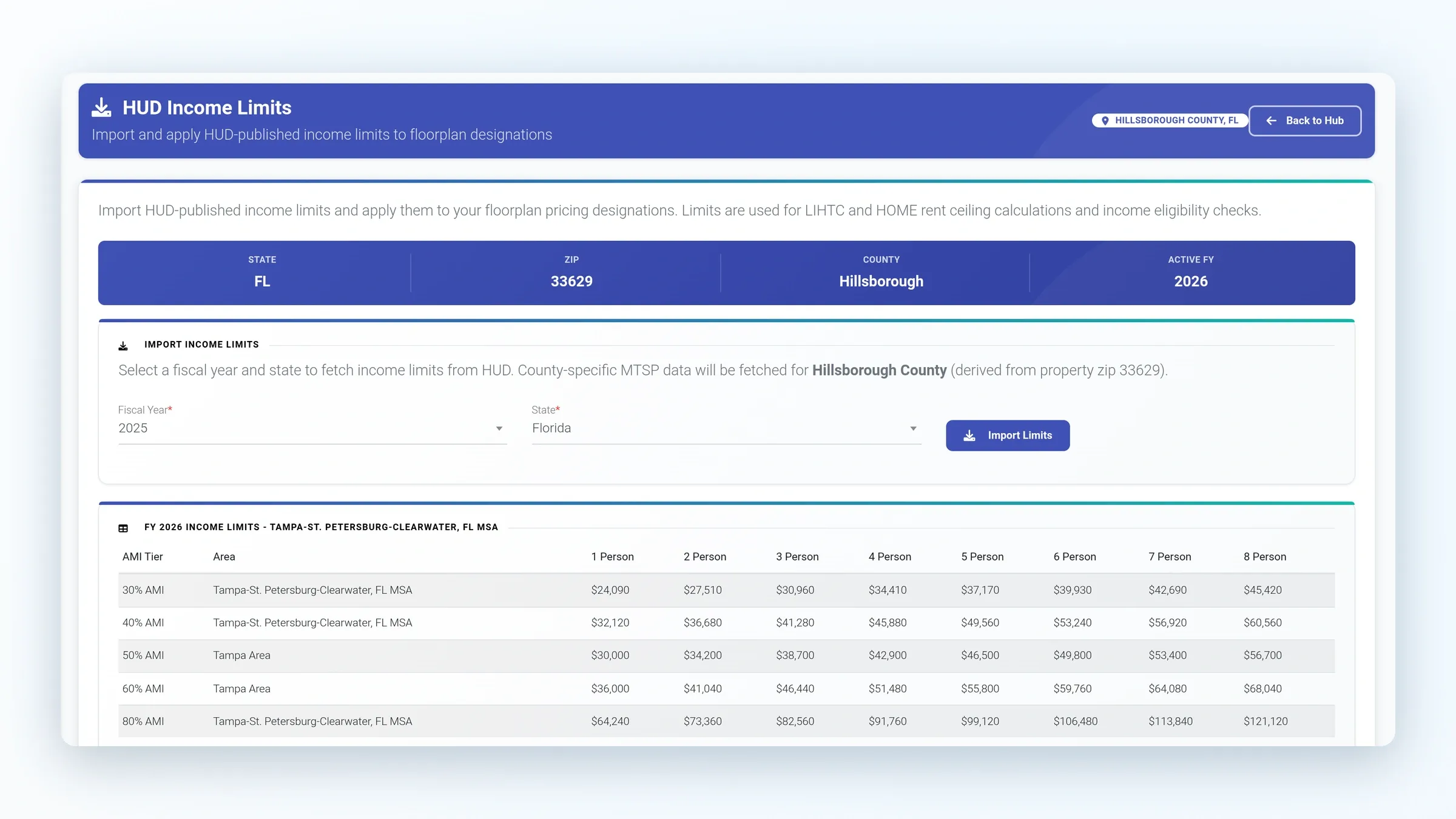
ExactEstate HUD Income Limits with one-person and two-person household amounts.

Follow the household all the way to the right filing system.

HUD income limits imported from HUD

ExactEstate imports HUD and MTSP income limits from HUD, so certifications are calculated against the published figures instead of a spreadsheet someone forgot to update.

Recertification scheduling and history

Recertifications are scheduled for each household, and each certification keeps its history: who generated it, who approved it and who verified it.

Online applications and e-signature

Applicants apply online and sign with ExactSign, or DocuSign if you prefer. Screening runs through TenantAlert or Western Verify, and email and text keep the file moving.

TRACS, PIC and NSPIRE aren’t interchangeable.

HUD Multifamily certifications go to TRACS as MAT files over iMAX, routed to the Contract Administrator, and agencies produce HUD-50058 files validated for PIC (see software for public housing agencies).

From an NSPIRE inspection, staff open a work order already filled in with that unit, so the repair is tracked where the inspector looked.

ExactEstate HUD Forms Reference Guide showing documented OwnerCertification workflow; reference documentation.

HUD MULTIFAMILY IN EXACTESTATE

See the HUD form and the submission path, end to end.

The HUD-50059 and 50059-A are built from the household file and sent to TRACS over iMAX; nothing is retyped.

  • HUD-50059 and 50059-A

    The system builds the HUD-50059 and the 50059-A partial certification from the household record.

  • TRACS MAT file

    TRACS files follow release 2.0.2.D, with MAT10 for full certifications and MAT40, MAT65 and MAT70 for partial certifications.

  • Transmission

    ExactEstate sends the MAT file over iMAX to the property's mailbox and reads the result files back.

  • HOTMA by effective date

    ExactEstate applies HOTMA by each certification's effective date. The mandatory date is January 1, 2027, and a property can record an earlier adoption date.

Good to know

  • Staff review HUD EIV reports alongside the household file during reconciliation.
  • Electronic vouchers go through our submission partner, or as native TRACS 202D files over iMAX.
  • TRACS files follow the released 202D specification until HUD releases 203A.

Moving from your current system

Bring your current exports: households, balances and the 50059 history behind them. The setup wizard maps each column and shows what is ready to go live.

We plan the move, load your certification history and train your team on the TRACS workflow. After go-live, EEva guides staff through everyday tasks in the app.

Book a HUD Multifamily demo

Core starts at $3 per unit per month, with a $300 monthly minimum. Affordable Housing adds $2 per unit per month.

PLAN YOUR MOVE

Your full affordable housing suite starts at $5 a unit.

Core is $3 per unit and the Affordable Housing module adds $2 for the HUD workflows. Price your configuration, then plan how your household and certification history comes over.

$3 / unit

ExactEstate Core, per unit per month, with a $300 monthly minimum. Add only the modules you use.

Plan your launch

Before go-live we line up your 50059 history, open certifications, matched balances, staff access and training. Our launch team works it through with you.

Get help moving your data

Bring your current system’s reports. ExactExtractor recognizes the familiar columns and asks staff to confirm anything uncertain before it is imported.

Bring the rejection, the recertification, or both.

Bring a certification that gave your team trouble and watch it go to TRACS clean.

See pricing

ExactEstate product screens for this page